

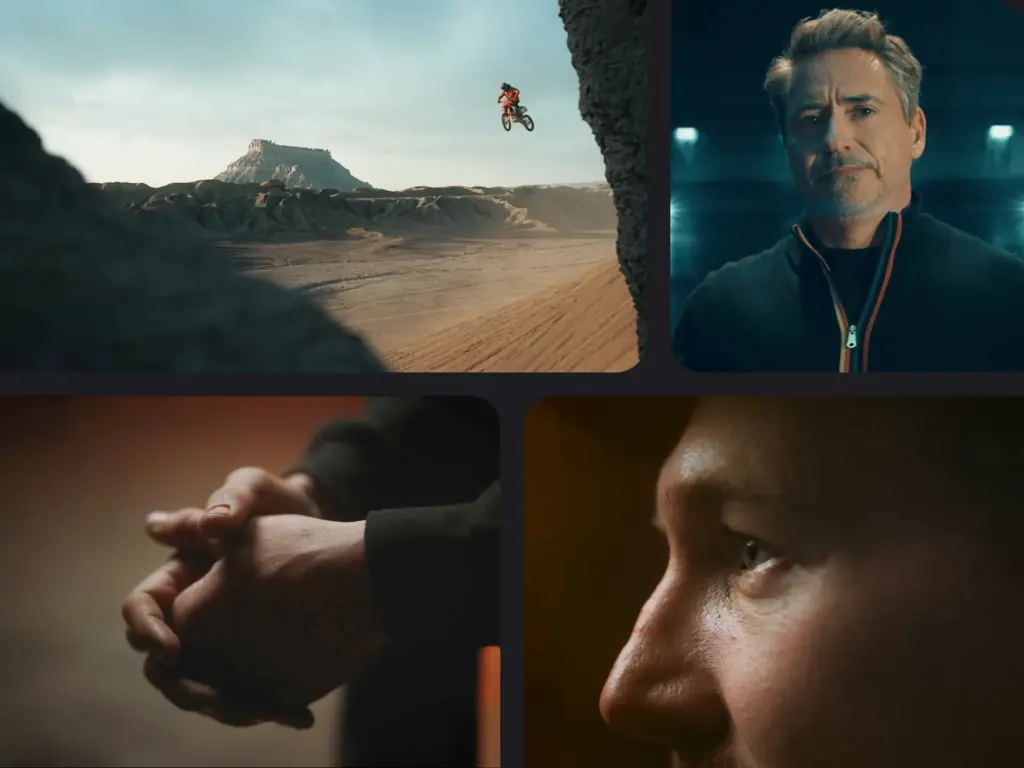
B-roll footage is supplementary video that enriches your main footage (A-roll) by adding visual context, depth, and professional polish to any video project.
Whether it’s a documentary, television show, music video, or testimonial clip, understanding how to effectively use both A-roll and B-roll footage is fundamental to creating engaging video content that holds viewer attention and conveys your message with impact.
- What B-roll is and why it's essential for professional video storytelling that holds viewer attention.
- How to apply the 60/40 and 70/30 ratio rules to balance A-roll and B-roll for engaging narratives.
- How to shoot three critical camera angles (wide, medium, close-up) that create visual variety and depth.
- The 4:1 shooting formula—capture 4 minutes of B-roll for every 1 minute of final video for maximum editing flexibility.
- How to plan B-roll during pre-production so you never miss essential shots on set.
- When to deploy B-roll in testimonials, documentaries, and brand videos for maximum storytelling impact.
What Is B-Roll Footage?
There are two types of footage you need to tell a visually compelling story.
In the early days, Hollywood films used “A-roll” and “B-roll” to describe their respective roles. B-roll refers to the accompanying footage intercut into the main shot (also known as “A-roll”) of a video edit.
For example, your A-roll could include your interview subject speaking to the camera. Any alternative footage, such as cutaways to surroundings or significant places, will be your B-roll. These cutaways are a great video marketing tool to keep your target audience engaged and help you convey what you are trying to say.
The versatility of using B-roll footage in various types of video productions enhances storytelling through visual interest, building tension, and maintaining viewer engagement.
A-Roll vs B-Roll: Key Differences
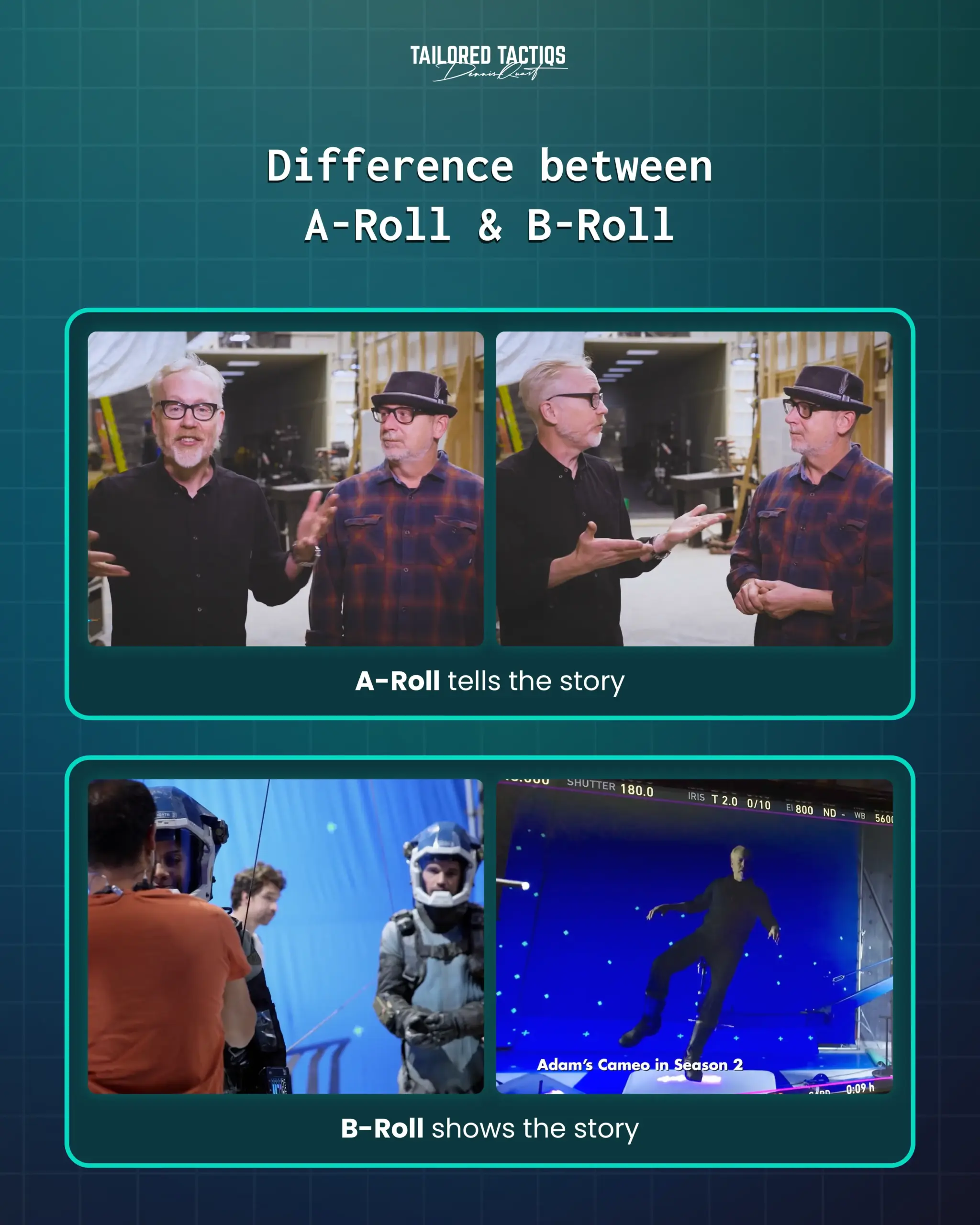
In simple terms: A-roll tells the story, B-roll shows the story.
The video below by Adam Savage interviewing the Key Stunt Rigger from The Expanse is an excellent example of how it can look.
The “A-roll” is the actual interview, while the B-roll scenes (set footage, final cuts, etc.) add to the context of the conversation.
This interview demonstrates how B-roll footage enhances the main interview conversation.

Now that you understand what B-roll is, let’s explore the different types of B-roll footage you can use in your productions.
What Are the Most Common Types of B-Roll Video?
1. Undirected Footage
Undirected footage is the video you shoot on-site and can be used to complement your main footage.
This type of B-roll footage, as the name implies, is not directed by your character.
These could be used for interview videos to show your character’s expressions and hands. Close-up shots can capture the nuances of these expressions and actions, enhancing the storytelling. For a documentary shoot, it can be the everyday activities your character is engaged in.
Utilizing different shots, such as wide shots, medium shots, and close-ups, is crucial to creating a visually compelling narrative.
This interview with Emma Raducanu, conducted by Prime Video, shows its application perfectly. They used a lot of B-roll footage to fill in the gaps.
2. Stock Footage
Many stock footage websites, like Adobe Stock or Storyblocks, will make it easy for you to find the B-roll you need.
Stock videos are an essential resource for creating B-roll footage, especially when video creators lack the time or budget to shoot their own. You just need to search for a key phrase to find footage relevant to the video you’re looking to make. While you will usually have to pay an additional fee to use the footage in your project without any attribution, there are times when you can get stock footage for free.
The following is a video I’ve created with parts of stock footage for one of our clients, Shohreh Aghdashloo, for Valentine’s Day as a message to her fans.
3. Establishing Shots
An establishing shot in television and filmmaking lets the viewers know the context for the scene.
Using different angles in establishing shots can enhance storytelling by providing a richer and more visually engaging introduction. Setting can include both place and time, as well as the time of day and possibly time in history. For example, do you see horses and buggies on the streets or a spaceship flying in the background?
A wide-angle shot can establish context within a scene by allowing viewers to grasp the setting and atmosphere, making it particularly effective for showcasing environments such as neighborhoods or towns.
One of our favorite establishing shots is the intro scene in Marvel Studios’ Thor: The Dark World when Thor returns to his home in Asgard.
So, technically, an establishing shot is a wide shot (also known as a long shot) or aerial shot showing a lot about the setting for context.
For a variety of reasons, establishing shots are different from other shots in a movie:
- The setting shots are a way to set the scene for what’s coming. They don’t have to last more than a few seconds.
- The characters are rarely included in establishing shots. The setting where the action is taking place is what most establishing shots are focused on.
- Establishing shots don’t include dialogue. They are accompanied by music or sound effects.
- Although they might be used to set the mood or emotion that audience members are about to experience, they are not emotionally expressive.
Stock footage might suffice as B-roll if a shot list requires a basic establishing shot in Los Angeles, for example.
Understanding these different types of B-roll is essential, but knowing how to capture them effectively is what separates amateur from professional video production.
How to Shoot B-Roll
How to shoot B-roll effectively comes down to three key practices: planning ahead, capturing varied camera angles, and recording more coverage than you think you need.
It’s common to use a 60% A-roll to 40% B-roll ratio in documentary-style videos, or a 70% A-roll to 30% B-roll ratio for feature films, striking a balance that keeps the narrative engaging and visually dynamic.
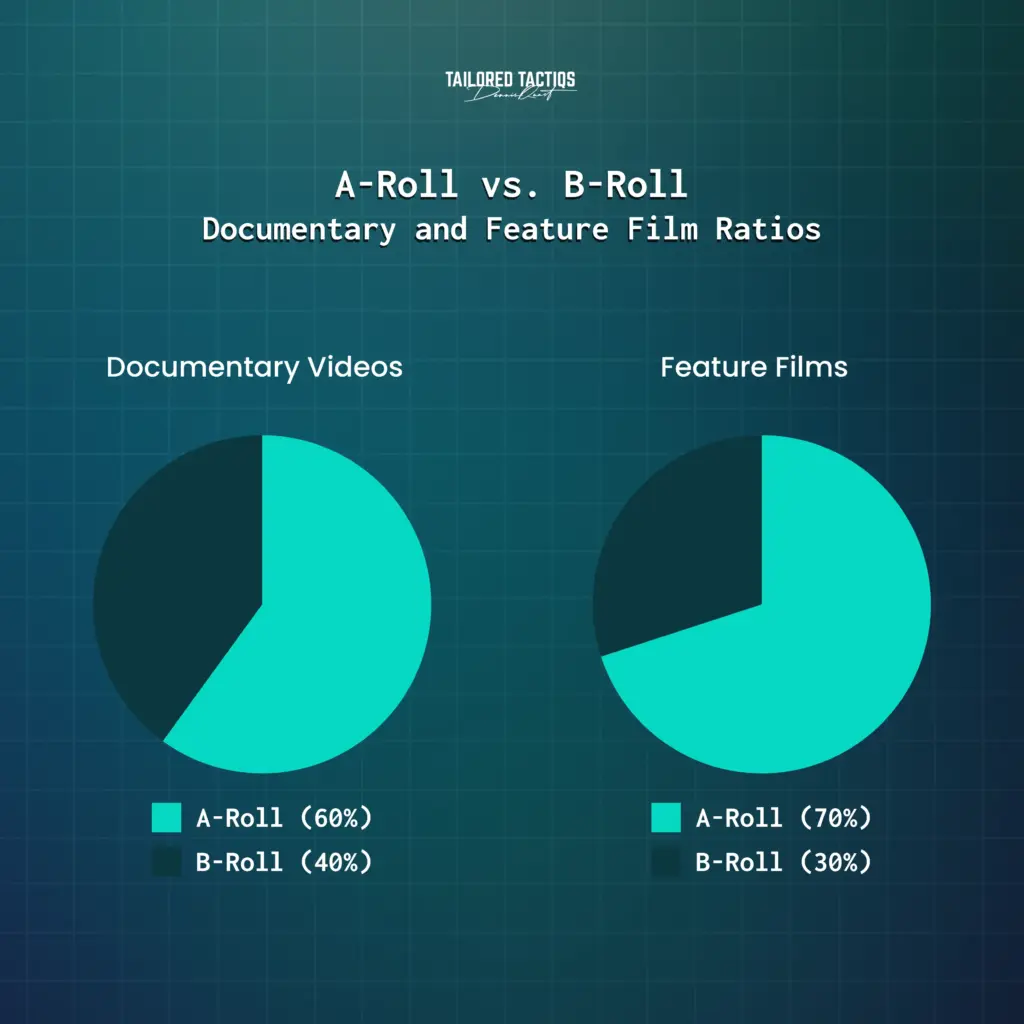
Shooting B-roll footage from a variety of angles enhances the visual storytelling of a video.
1. Planning Ahead
As you would plan every other aspect of your video, you should also plan your B-roll. Review your script and take note of the scenes that would benefit from B-roll footage. Make sure you know what your main footage is before you start to build around it.
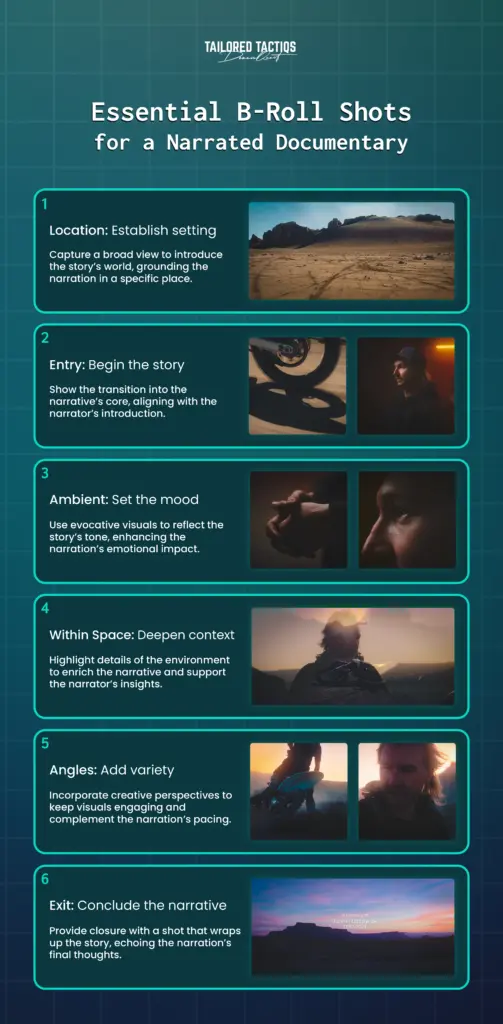
For example, when interviewing a subject in their home, you should plan to capture exit and entry footage, ambient footage, and shots within/of the space.
To ensure you tell the entire story, create a list with the “must-haves” and the “nice-to-haves.”
AOD Films’ breathtaking short documentary “Trails of Dust” is a perfect example of employing such B-roll footage.
This documentary demonstrates strategic B-roll planning with environmental shots, action sequences, and detailed close-ups working together.
Upon closer inspection, it contains the same elements of essential B-roll footage as outlined in our infographic below.
2. Get Different Camera Angles
It’s always a good idea to get multiple shots of the same thing, with or without your subject, to have enough variety in your B-roll footage.
Utilizing different shots, such as wide shots, medium shots, and close-ups, is crucial to creating a visually compelling narrative. In case you have to cut parts away, this will cover you.
For educational purposes and to explain the different camera angles, we’re using a few shots from the YouTube documentary series “The Age of A.I.” hosted by Robert Downey Jr. (off-topic, it’s a brilliant series about the evolution of AI).
Wide-Angle Shot
This is often an establishing or environmental shot and shows your subject in action. Wide-angle shots can help to place the viewer in your scene and provide context about where the action is taking place.
Medium Shot
Also known as a “waist shot,” a medium shot is a portrait taken at a moderate distance. Medium shots are good for subjects who are speaking or moving, and they’re the workhorse of most video productions.
Close-Up Shot
Close-ups are the shots that show the details. Close-ups are intimate and highlight subtleties that may otherwise go unnoticed. It frames an actor’s face, making their reaction the focus of the frame.
Shot Type Quick Reference
Now that you understand the different camera angles, here’s a comparison to help you choose the right shot for your needs:
| Shot Type | Primary Purpose | Typical Duration | Best Used For |
|---|---|---|---|
| Wide-Angle Shot | Show subject in environment | 5-10 seconds | Action sequences, establishing location and spatial context |
| Medium Shot | Capture subject speaking or moving | 10-30 seconds | Interviews, demonstrations, showing body language |
| Close-Up Shot | Highlight details and emotions | 3-8 seconds | Emotional moments, product details, reactions |
| Establishing Shot | Set scene location and context | 3-5 seconds | Opening sequences, location transitions |
Pro tip: If you're trying to capture a close-up or pan of an important document or an old photograph, use the “Ken Burns Effect” to shoot close-ups and tilts. This will add movement to still images, making them more attractive to the viewer of your video.
In the example below, we’re using a still of the same documentary scene and zoom in from the outer grey border to the blue one at which it will stop.

The result is going to look like this:

With video editing software, you can achieve the Ken Burns Effect quickly.
For example, in Apple’s iMovie and Final Cut Pro, you can find it under “Ken Burns effect,” and in other software, it’s called “Pan and Zoom.”
3. Shoot More Footage than You Need
Keep your camera rolling if you have the chance to capture extra footage.
You might catch something even more fascinating than you initially thought. Record some additional timelapse shots of the surroundings and scout the area.
B-roll should be high quality and stable to enhance the overall production value, ensuring that it seamlessly integrates with the primary footage and elevates the final video.
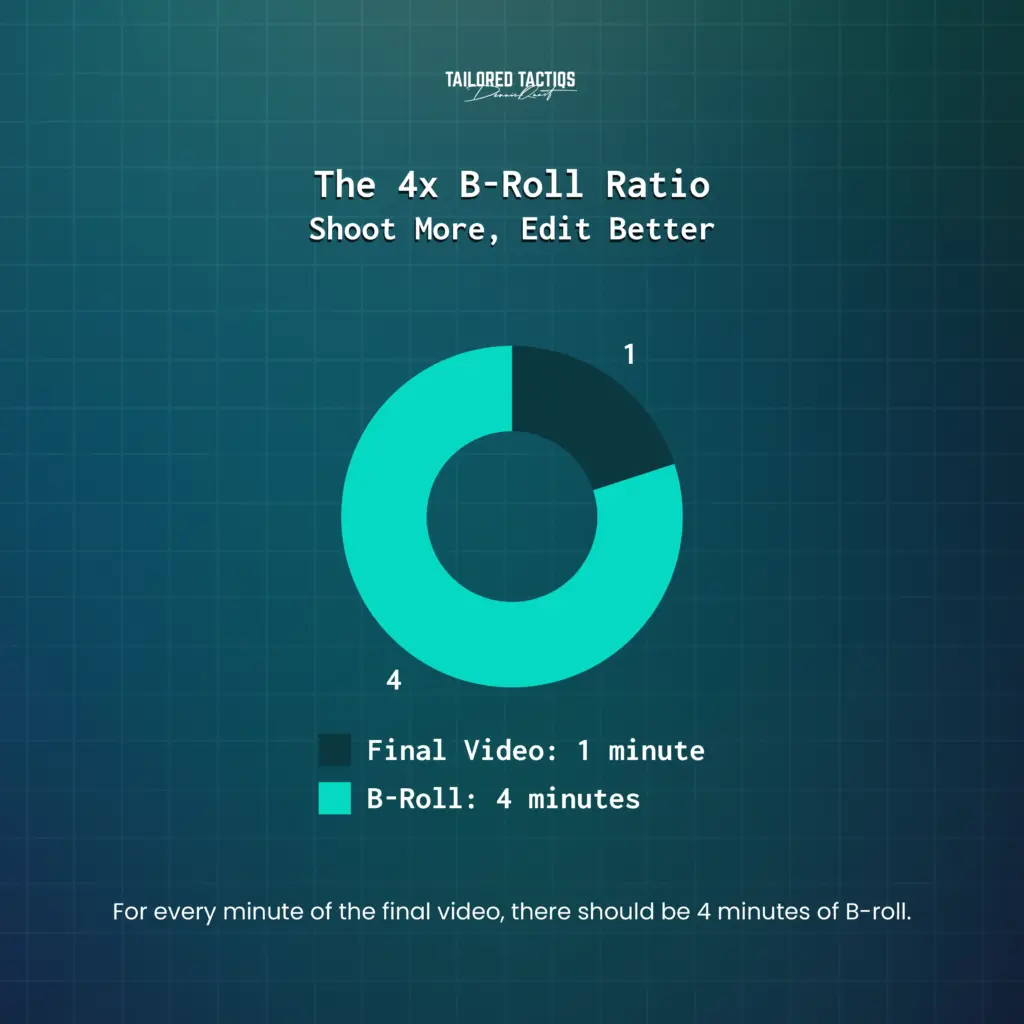
Pro tip: Make sure you have enough B-roll for at least four times the length of your final video creation.
For example, you should shoot 4 minutes of B-roll if the interview ends in a minute. Of course, you won’t use it all, but it’s essential to have options. Extra footage is crucial for enhancing storytelling and providing editing flexibility.
Common B-Roll Mistakes to Avoid
Even experienced videographers make B-roll mistakes that can undermine their production quality. Here are the most common pitfalls and how to avoid them:
1. Shooting B-Roll That Doesn’t Match Your Story
B-roll should directly support your narrative, not just look pretty. Avoid capturing “filler” footage that has no connection to what’s being said in your A-roll.
Before shooting, ask: “Does this shot reinforce or illustrate what the viewer is hearing?”
Example: If your subject is discussing financial struggles, B-roll of luxury items creates cognitive dissonance. Instead, show bills, calculators, or stressed expressions.
2. Inconsistent Visual Style
Mixing B-roll shot at different frame rates, color temperatures, or resolutions creates a jarring viewing experience. Always match your B-roll camera settings to your A-roll: same frame rate (24fps, 30fps, or 60fps), resolution (1080p or 4K), and color profile.
If you’re using stock footage, carefully select clips that match your production’s visual aesthetic—paying attention to color grading, lighting style, and image quality.
3. Shaky or Unstable Footage
Handheld B-roll can work for documentary realism, but unintentional camera shake looks amateurish. Use a tripod, gimbal, or stabilizer for professional results. If shooting handheld, brace yourself against walls or use proper handheld technique (elbows tucked, smooth movements).
Exception: Intentional handheld movement can convey urgency or documentary authenticity—but it should be a creative choice, not a technical limitation.
4. Not Shooting Enough Coverage
The biggest mistake is not having enough B-roll when you reach the editing stage. Remember the 4:1 rule: shoot at least 4 minutes of B-roll for every 1 minute of final video. Running out of B-roll options forces you to reuse shots, which looks repetitive and unprofessional.
Pro tip: When shooting an important scene, capture it from at least three different angles (wide, medium, close-up) to give yourself editing options.
5. Ignoring Audio on B-Roll Clips
While B-roll visuals are the focus, don’t ignore audio. Capture clean ambient sound or room tone during B-roll shoots—this audio can be layered under your A-roll to create a more immersive experience. Footsteps, environmental sounds, and natural ambiance add depth to your final edit.
Even if you plan to use music, having quality ambient audio gives you more creative options in post-production.
6. Cutting B-Roll Too Quickly
Rapid-fire B-roll cuts can feel chaotic and exhausting for viewers.
Each B-roll shot needs enough time to register—typically 3-5 seconds minimum for establishing shots and 2-3 seconds for quick cutaways. Let your footage breathe so viewers can absorb what they’re seeing.
Match your cutting pace to your content’s tone: slower, contemplative pieces need longer B-roll holds, while energetic content can handle faster cuts.
7. Forgetting to White Balance
Nothing screams “amateur” like B-roll footage with incorrect white balance—orange indoor shots or blue outdoor footage. Always set your white balance manually for each location and lighting condition.
If shooting in mixed lighting (natural + artificial), choose a dominant light source or use custom white balance.
While color correction can fix minor issues in post, severely incorrect white balance is difficult to salvage without degrading image quality.
Editing B-Roll Footage
Editing B-roll footage is an essential part of the post-production process. It involves incorporating the secondary footage into the primary footage to create a cohesive narrative.
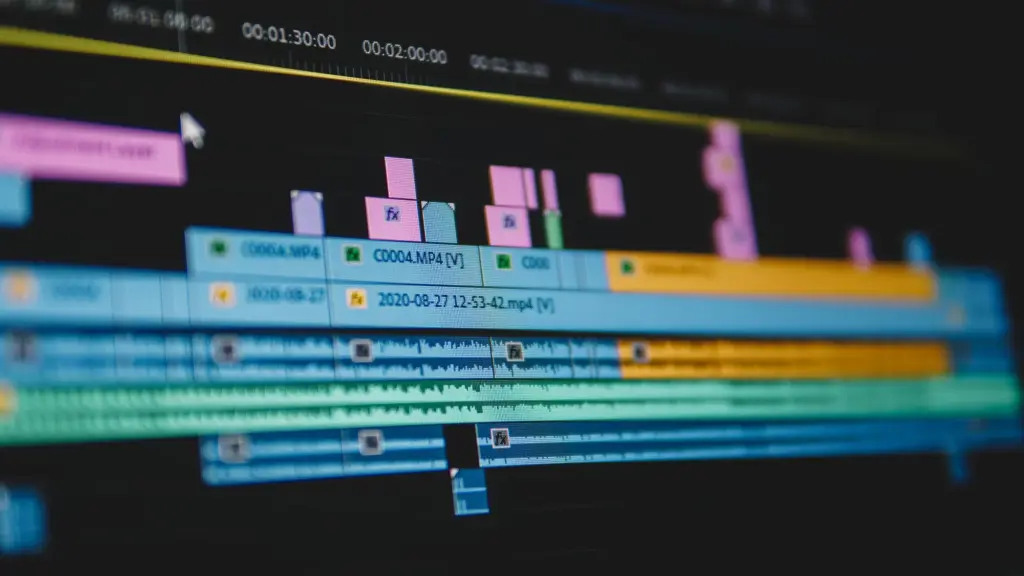
The editor must consider the pacing, tone, and visual flow of the story when editing B-roll footage.
For instance, B-roll can be used to break up long segments of A-roll, providing visual relief and maintaining the viewer’s interest. It can also be used to cover up cuts or transitions in the primary footage, ensuring a smooth and seamless viewing experience. Additionally, B-roll footage can help to establish the setting, convey the passage of time, or provide additional context to the main story.
By carefully selecting and editing B-roll footage, editors can enhance the overall quality and impact of the final video, making it more engaging and visually appealing for the audience.
Best Use Cases for B-Roll
We can’t stress it enough. B-roll adds context and layers to storytelling. A scene that captures the subject entering or leaving a location or shots of an exterior location directs the viewer’s attention into and out of a scene.
Pre-production planning for feature films or short films is crucial, including the need for detailed storyboards and B-roll footage to enhance the narrative quality.
For those aspiring to become a successful documentary filmmaker, the journey and skills required highlight the need for practice and patience.
Let’s take a look at the common use cases for your B-roll.
1. Testimonials
The number one type of video you want to use your B-roll for is testimonials.
According to a survey by Wyzowl, 2 out of 3 people say they’d be more likely to purchase after watching a testimonial video demonstrating how a business, product, or service had helped another person like them.
So, video testimonials can be a great way to build your customer base and help customers make better purchasing decisions.
B-roll shots are essential in enhancing visual storytelling for testimonials by providing context and variety, making the narrative more engaging. This high-production video by Mailchimp uses a lot of B-roll footage.
2. Storytelling Videos
Storytelling videos are a powerful way to connect emotionally with your audience and communicate your brand’s core values.
Supplemental footage, such as B-roll, adds visual context that makes these stories more engaging and immersive. You don’t need a big production team either—for example, we created a behind-the-scenes video for Shohreh Aghdashloo’s social channels using only smartphone footage captured on set.
Smartphone footage can create effective B-roll when captured intentionally, showing set preparation, costume details, and candid moments.
3. Documentaries
It is not often that the camera stays on top of a shot of someone talking directly to the camera, as you might have noticed in a documentary.
Instead, you may have a shot of someone talking and then cut to the B-roll that supports the story. B-roll footage is often used to cover pauses or awkward moments in A-roll, ensuring a smoother and more engaging viewing experience.
Documentary filmmaking involves various techniques and storytelling methods essential for creating engaging documentary content. These include the use of B-roll, interviews, and narrative structures to effectively convey the subject matter and enhance the viewer’s experience.
Documentaries must set the scene for the story they will be telling viewers and convey that story with a level of authority.
For example, this Netflix documentary “Our Planet” starts with numerous beautiful establishing shots or “aerial B-roll” of the planet from space and vast forests to introduce the viewer to the episode.
4. Movies & Television
The fourth most common case is trailers, and generally, in movies and on television. A trailer is packed with lots of B-roll footage to establish the characters, conflicts, and action in a short time.
Transitional footage plays a crucial role in facilitating smooth transitions between scenes or segments, enhancing the storytelling process. It brings excitement, turns up the emotion, and is meant to increase video views and the conversion rates of your content marketing strategy.
Here is an eye-popping movie trailer example that generates interest in the sci-fi action film “The Matrix Resurrections.”
Movie trailers maximize B-roll to showcase action sequences, character moments, and visual effects without revealing plot details.
Frequently Asked Questions About B-Roll
How much B-roll footage do I need for a 1-minute video?
For a 1-minute final video, shoot at least 4 minutes of B-roll footage. This 4:1 ratio provides editing flexibility and ensures you have multiple options to enhance your storytelling. Documentary projects may require even more coverage depending on complexity.
Can I use stock footage as B-roll?
Yes, stock footage is an excellent B-roll option when you lack time or budget to shoot original footage. Platforms like Adobe Stock, Storyblocks, and Pexels offer both paid and free options. Ensure the stock footage matches your video’s quality, color grading, and visual style for seamless integration.
What camera settings should I use for B-roll?
Match your B-roll settings to your A-roll for consistency: use the same frame rate (24fps, 30fps, or 60fps), resolution (1080p or 4K), and color profile. For B-roll specifically, consider shooting at a higher frame rate (60fps or 120fps) to create slow-motion options during editing.
Do I need a separate camera for B-roll?
Not necessarily. You can shoot B-roll with the same camera used for A-roll, either before or after your main shoot. However, having a second camera allows you to capture spontaneous B-roll moments while your main camera records A-roll, particularly useful for events or documentary work.
Conclusion
Understanding what B-roll is and how to shoot it effectively transforms your video production from amateur to professional.
By applying the 60/40 ratio rule, capturing varied camera angles, and planning your B-roll during pre-production, you’ll create visually compelling content that holds viewer attention and elevates your storytelling.
Remember to shoot at least 4 times the footage you need (the 4:1 rule), avoid the seven common mistakes we covered, and match your B-roll style to your A-roll for seamless integration. Whether you’re creating testimonials, documentaries, or brand videos, B-roll is essential for professional video production.
Ready to take your video marketing to the next level?
Check out our comprehensive guide on how to get started with video marketing, or learn about how Dollar Shave Club built its brand with video.





 English
  German